I test in Elisp si eseguono con ERT, una libreria di Emacs Lisp per i test di regressione e unitari. I test si possono eseguire in diversi modi.
Per eseguire i test in modo interattivo dall'interno di Emacs:
- Apri il file di test,
M-x eval-buffer RET
- In modo interattivo e singolarmente, con
M-x ert RET test-name RET
- In modo interattivo e tutti insieme, con
M-x ert RET t RET
Tieni presente che così eseguirà tutti i test attualmente caricati in Emacs!
- Esegui di nuovo
M-x eval-buffer RET prima di testare ogni volta che hai apportato modifiche
Per eseguire solo i test nel buffer corrente, puoi aggiungere questo al tuo .emacs o init.el:
(defun my-eval-and-run-all-tests-in-buffer ()
  "Delete all loaded tests from the runtime, evaluate the current buffer and run all loaded tests with ert."
  (interactive)
  (ert-delete-all-tests)
  (eval-buffer)
  (ert 't))
Dopo aver riavviato Emacs:
- Apri il file di test
M-x my-eval-and-run-all-tests-in-buffer RET
I test interattivi sono ottimi mentre lavori a un esercizio, ma quando vuoi verificare che un esercizio sia pronto per l'invio è preferibile testare in modalità batch.
Per eseguire tutti i test dal terminale, in modalità batch, esegui emacs -batch -l ert -l *-test.el -f ert-run-tests-batch-and-exit
Il comando qui sopra è un po' macchinoso, quindi, se vuoi:
- Crea un file nel tuo
$PATH (probabilmente in ~/bin) chiamato ert-run
- Il contenuto del file dovrebbe essere il seguente:
#!/usr/bin/env sh
emacs -batch -l ert -l $1 -f ert-run-tests-batch-and-exit
- Rendi eseguibile il file con
chmod +x ert-run
Dovresti riuscire a chiamare semplicemente ert-run *-test.el ed eseguire i test in modalità batch.
Altre opzioni sono disponibili nella documentazione, C-h i m ert RET.
Lavorare sugli esercizi
Dato che Emacs è esso stesso un interprete di Elisp, il codice su cui lavori è sempre nel suo ambiente di esecuzione nativo. Puoi valutare qualsiasi forma premendo C-x e alla fine della forma, oppure una selezione con M-x eval-region o l'intero buffer con M-x eval-buffer. Può essere estremamente utile per fare debug del codice rapidamente.
Suggerimenti
Dato che sia il codice sia i test sono Elisp valido, ti consigliamo di lavorare al codice dell'esercizio in un riquadro affiancato al suo file di test, così:
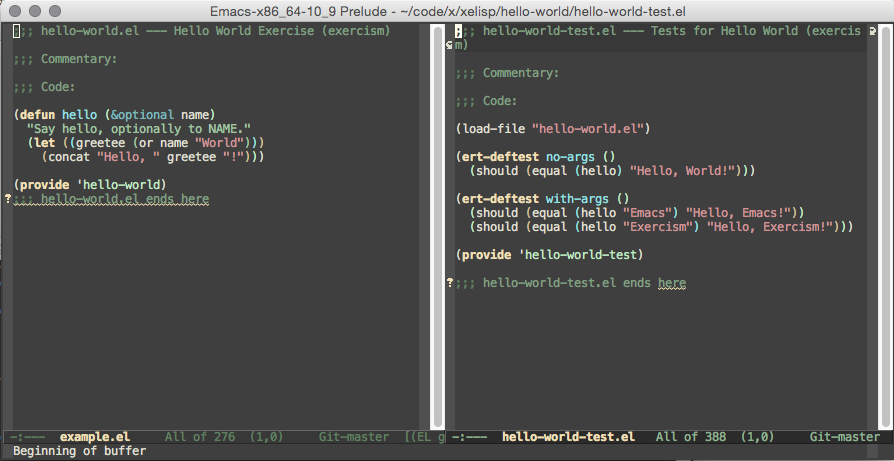
Dividi il frame verticalmente con C-x 3, passa alla nuova finestra con C-x o e apri il file con C-x C-f /path/to/file.


































